
Nachricht
Directus CMS Review 2026: Worth It for Your Project?
Quick Summary: Directus is an open-source, database-first headless CMS offering 50+ features including REST & GraphQL APIs, visual data modeling, and real-time collaboration. It stands out by wrapping existing databases rather than forcing proprietary schemas, making it ideal for teams that need full control over their data layer without vendor lock-in.
Choosing a headless CMS in 2026 feels like standing at a fork in the road with a dozen paths branching out. Too many options, conflicting advice, and the nagging worry that you’ll lock yourself into the wrong architecture.
Directus has been gaining serious traction in developer communities, positioning itself as a “data engine” rather than a traditional CMS. But does that distinction actually matter for your project?
This review cuts through the marketing speak and examines what Directus delivers in practice. We’ll cover its architecture approach, feature set, pricing structure, and where it shines versus where it struggles.
What Makes Directus Different From Traditional Headless CMS Platforms
Most headless CMS platforms force you into their content model. Create a schema in their interface, store content in their database, and hope their API design matches your needs.
Directus flips that equation.
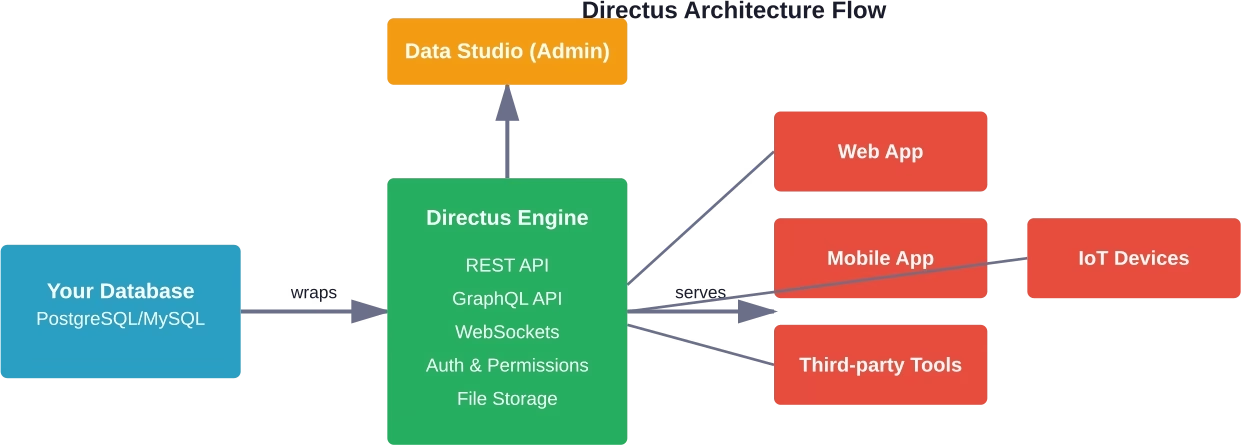
It’s built to wrap around your existing database—whether that’s PostgreSQL, MySQL, MariaDB, or another SQL database. The platform generates a real-time admin interface and APIs based on your actual database schema. Change a table structure? The admin panel and endpoints update automatically.
This database-first approach means developers maintain full control over their data layer. No proprietary schemas. No migration headaches if you decide to switch platforms later. Your database remains the source of truth.
According to the official Directus documentation, the platform functions as a data engine with APIs and developer tools that connect directly to your database. This architecture makes it fundamentally different from code-driven headless CMS platforms like Strapi, which build abstractions on top of database layers.
The practical implication? Teams with existing databases can add Directus without restructuring their entire data architecture. Legacy applications get a modern admin interface without rewriting backend logic.
The Data Studio Interface
Directus provides what it calls the Data Studio—a web application that non-technical team members can actually use. Editors manage content, marketing teams update assets, and operations staff handle workflows without touching code.
The interface offers visual data modeling, meaning you can design database relationships through a graphical interface rather than writing SQL migrations manually. Drag relationships between tables. Define field types visually. The underlying database schema updates accordingly.
Real-time collaboration features let multiple team members work simultaneously. Changes propagate instantly across active sessions—similar to Google Docs but for structured data management.
Core Features and Capabilities
According to the official Directus features page, the platform includes 50+ features covering data management, APIs, permissions, and workflow automation. All features are open source, with no artificial restrictions in the community edition.
Here’s what that actually includes in practice.
API Architecture
Directus generates both REST and GraphQL APIs automatically from your database schema. No manual endpoint configuration required for basic CRUD operations.
The REST API follows standard conventions with filtering, sorting, pagination, and field selection built in. Query parameters let you retrieve exactly the data structure you need without over-fetching.
GraphQL support provides schema introspection, nested queries, and the flexibility to request specific fields across relational data. For teams already using GraphQL clients, integration is straightforward.
Real-time functionality uses WebSocket connections for live data subscriptions. Applications can receive instant updates when database records change without polling endpoints repeatedly.
Permissions and Access Control
Granular permissions operate at the field level, not just table or record level. Define exactly which roles can read, create, update, or delete specific fields within specific collections under specific conditions.
Rule-based permissions use custom filters to control data access. An editor might see only their own drafts. Regional managers might access only records tagged for their geography. The permission system handles these scenarios through configurable filters rather than hardcoded logic.
Role-based access control (RBAC) lets teams create custom roles with precisely tailored permissions. Separate what developers, editors, marketers, and external partners can access within the same Directus instance.
File Management and Digital Assets
The platform includes built-in digital asset management with on-the-fly image transformations. Request different sizes, formats, or quality levels through URL parameters without pre-generating variants.
Storage adapters connect to local filesystems, AWS S3, Google Cloud Storage, Azure Blob Storage, or other providers. Switch storage backends without changing application code.
Metadata extraction pulls EXIF data, file dimensions, and other information automatically. Tag assets, organize into folders, and search across metadata fields through the Data Studio interface.
Workflow-Automatisierung
Directus includes a flow engine for automating tasks based on database events, scheduled triggers, or webhook calls. Build workflows visually by connecting operation nodes.
Common automation scenarios include sending emails when records change, syncing data to external systems, processing uploads, or triggering builds in static site generators.
The flows system supports conditional logic, loops, transformations, and custom scripting when built-in operations don’t cover specific requirements.
Pricing Structure and Licensing
Directus operates under a dual licensing model that’s worth understanding in detail.
Self-Hosted Open Source
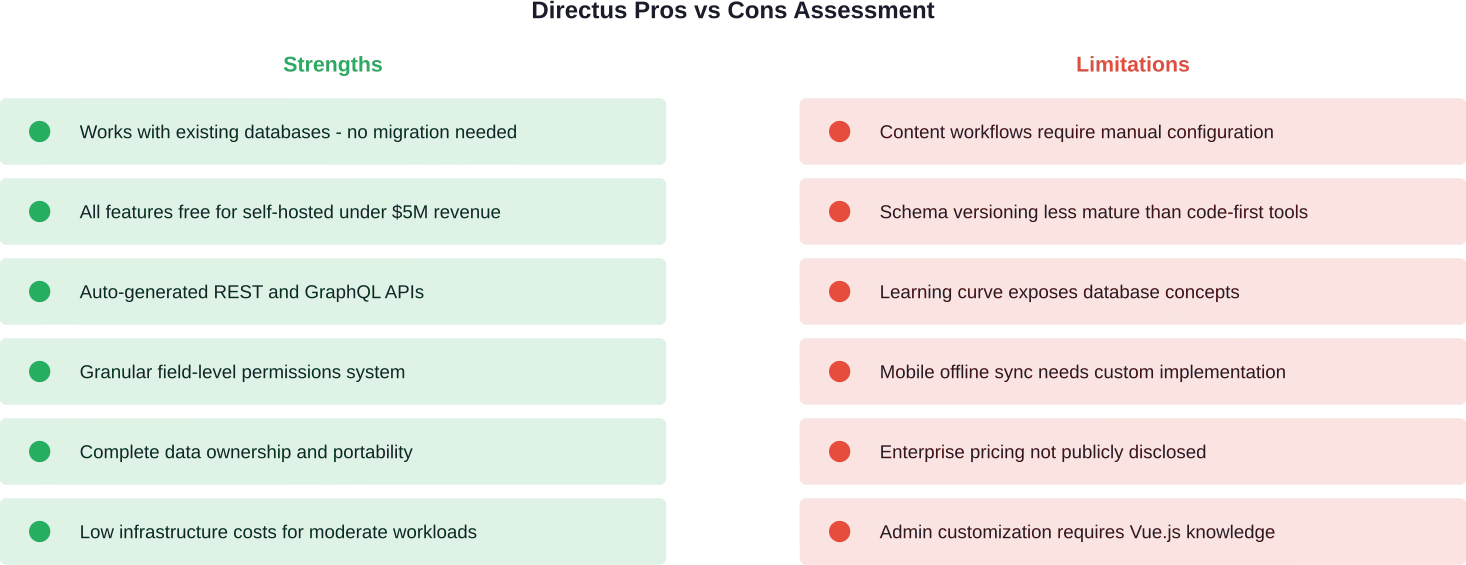
Directus is licensed under the BSL 1.1 (Business Source License). It is free for individuals and companies with less than $5 million in total annual revenue. For others, it requires a commercial license. After three years, the code reverts to GPLv2.
This is a critical distinction. According to community discussions, the free version of self-hosted Directus encompasses all features without artificial limitations. Compare that to platforms like Strapi where premium features require paid licenses regardless of revenue.
Organizations exceeding $5 million in annual revenue need to purchase an enterprise self-hosted license. Pricing for these licenses isn’t publicly listed—it’s a “contact sales” situation—but community discussions suggest it scales based on company size and usage.
Directus Cloud Pricing
For teams that prefer managed hosting, Directus offers cloud plans. According to the official pricing page, the pricing structure breaks down as follows:
|
Plan |
Professional |
Unternehmen
|
|---|---|---|
|
Monthly Price |
$99 |
Custom |
|
Studio Users Included |
5 users | Custom |
|
Additional Users |
$15/user |
Custom |
| Database Entries | 75,000 |
Custom |
|
API Requests/Month |
250,000 | Custom |
|
API Bandwidth/Month |
500 GB | Custom |
| Total File Storage | 150 GB |
Custom |
| Max Asset Size | 500 MB |
Custom |
| Configurability | Basic |
Advanced |
The Professional cloud plan starts at $99 monthly and includes five studio users. Additional users cost $15 each. Usage limits are capped—exceed them and you’ll need to upgrade or optimize usage.
Enterprise plans offer custom limits tailored to specific requirements, advanced configurability, and dedicated support. Pricing varies based on scale and needs.
One cost consideration: according to community feedback, infrastructure can stay under $200/month for moderate workloads handling around 10 active users. Cloud convenience versus self-hosted cost control becomes a trade-off based on team priorities.
How Directus Compares to Alternative Headless CMS Options
Real talk: Directus isn’t the only database-first or developer-focused headless CMS out there. How does it stack up against the usual suspects?
Directus vs Strapi
Strapi is probably the most common comparison point. Both are open source, both target developers, and both offer self-hosting options.
The key difference? Strapi is code-driven. Define content types in JavaScript configuration files. Version controls those files. Deploy changes through your CI/CD pipeline. It’s familiar territory for developers comfortable with infrastructure-as-code approaches.
Directus takes the opposite approach. Configure data models through the admin interface. Changes write directly to the database. Less Git ceremony, but also less explicit versioning of schema changes.
Feature parity differs too. According to comparison discussions, Directus includes content versioning in its free self-hosted version, while Strapi restricts versioning to paid enterprise licenses. For teams that need audit trails of content changes, that’s a significant difference.
Draft and publish workflows exist in both platforms, but implementation varies. Strapi handles this natively for all content types. Directus requires additional configuration using status fields and permissions to achieve similar functionality.
Pricing favors Directus for self-hosted deployments under the $5 million revenue threshold. Strapi’s community edition lacks several features that unlock only with premium licenses, regardless of company size.
Directus vs Payload CMS
Payload is a newer TypeScript-based headless CMS that’s gaining traction. Like Directus, it offers self-hosting and full source code access.
Payload leans heavily into the code-first paradigm. Everything—including the admin interface—is defined through TypeScript configuration. Developers get complete control over admin UI customization through React components.
Directus provides less admin UI customization out of the box but requires less code to get running. Teams without extensive frontend development resources might find Directus more accessible.
Both platforms support existing databases. Payload CMS fully supports PostgreSQL and MongoDB, but also added SQLite support in version 3.0.
Directus vs Sanity
Sanity represents a different philosophy entirely. It’s a proprietary platform with generous free tiers but ultimately SaaS-based infrastructure.
According to G2 data, Sanity’s pricing starts at $10/seat/month, with real-time collaboration and structured content editing as standout features. The platform excels at content modeling flexibility and provides excellent developer experience through its GROQ query language.
The trade-off? You’re storing content in Sanity’s infrastructure. Migration complexity increases if you ever need to move off the platform. Directus keeps your data in a standard SQL database that any application can access directly.
For teams prioritizing vendor independence and data portability, Directus offers clear advantages. For teams wanting managed infrastructure with sophisticated real-time editing, Sanity might fit better.
Where Directus Excels
Every platform has sweet spots where it performs exceptionally well. Here’s where Directus shines brightest based on real-world implementations.
Modernisierung von Altsystemen
Organizations with existing databases face a common problem: the data structure is solid, but the admin interface is outdated or the APIs are inadequate for modern applications.
Directus solves this cleanly. Point it at your existing PostgreSQL or MySQL database, configure permissions, and suddenly you have a modern admin interface plus REST and GraphQL APIs without restructuring data.
This approach means you can modernize incrementally. Keep legacy applications running against the same database while new applications consume data through Directus APIs. No big-bang migrations. No downtime.
Data-Heavy Applications
When your application is fundamentally about structured data rather than content publishing, Directus makes more sense than traditional CMS platforms.
Real-world implementations focus on operational platforms, internal tools, inventory management systems, and data-driven dashboards. These scenarios involve complex relational data that maps naturally to SQL databases.
The visual data modeling interface lets non-developers understand and modify data structures without learning database administration. Operations teams can add fields, create relationships, and adjust schemas through the admin panel.
Multi-Database Architectures
Some projects need to work with multiple existing databases simultaneously. Directus can connect to different database instances and provide unified APIs across them.
This capability supports scenarios like aggregating data from regional databases, creating read-only interfaces to production databases, or building admin tools that touch multiple data sources.
Cost-Conscious Projects
For teams under the $5 million revenue threshold, self-hosted Directus offers remarkable value. All features included, no license fees, complete source code access.
Running costs depend on infrastructure choices, but according to community feedback, infrastructure can stay under $200/month for moderate workloads handling around 10 active users. That’s significantly cheaper than enterprise SaaS CMS platforms that charge per user or per project.
Limitations and Potential Drawbacks
No platform is perfect for every scenario. Here’s where Directus shows weaknesses or requires workarounds.
Content Workflow Complexity
Traditional CMS platforms often include sophisticated content workflows out of the box—draft states, approval chains, scheduled publishing, revision comparison.
Directus handles some of this through custom fields and permissions configuration, but it’s not as turnkey as platforms built specifically for content publishing. Teams need to architect their own workflow logic using status fields, role permissions, and automation flows.
For simple publish/unpublish scenarios this works fine. For complex editorial workflows with multiple approval stages, expect configuration overhead.
Schema Migration Management
The admin-driven data modeling approach creates a version control challenge. When you modify database structure through the Directus interface, those changes write directly to the database.
How do you version those changes? How do you apply the same schema modifications across development, staging, and production environments?
Directus provides schema snapshot and diff tools, but the workflow feels less mature than code-first platforms where database migrations live in version-controlled files that deploy through standard CI/CD pipelines.
Development teams comfortable with infrastructure-as-code practices might find this friction.
Learning Curve for Non-Technical Users
Despite the visual interface, Directus exposes database concepts directly. Users see collections, fields, and relationships—database terminology rather than content-centric abstractions.
For technically-minded operations staff, this transparency is helpful. For marketing teams used to traditional CMS interfaces, it can feel unnecessarily complex.
Onboarding non-technical users requires explaining database concepts they wouldn’t encounter in platforms like WordPress or Contentful.
Offline Mobile Sync Challenges
Implementation of offline sync for mobile applications requires custom logic. While Directus provides APIs for data access, it doesn’t include built-in offline-first database synchronization like some mobile backend services.
Teams building mobile apps with offline capabilities need to implement their own sync logic, handle conflict resolution, and manage local database state. Directus provides the server-side APIs, but the client-side complexity remains.
Installation and Setup Process
Getting Directus running involves a few different paths depending on whether you’re self-hosting or using cloud infrastructure.
Self-Hosted Installation
According to the official documentation, Directus can run via Docker or through manual installation using Node.js.
The Docker approach is straightforward. Run the Docker command locally, select a project directory name, choose a backend template, pick a frontend framework if needed, and decide whether to install dependencies automatically.
Manual installation requires Node.js version 18 or higher and a supported database. Initialize a new project, configure database connection details, run migrations, and start the server.
Initial setup takes anywhere from 15 minutes to a few hours depending on infrastructure complexity and database configuration requirements.
Directus Cloud Setup
The cloud option eliminates infrastructure management entirely. Sign up, choose a plan, and Directus provisions a managed instance.
The hosted demo available through the official documentation lets teams test functionality before committing to paid plans. Keep in mind it’s a public demo that resets periodically—don’t input sensitive information.
Datenbankkonfiguration
For new projects, Directus can provision a fresh database. For existing databases, point Directus at your connection details and it introspects the schema automatically.
The platform supports PostgreSQL, MySQL, MariaDB, MS SQL Server, CockroachDB, and SQLite. Each database type has specific version requirements detailed in the technical documentation.
Customization and Extension Options
Directus provides multiple extension points for customizing functionality beyond what the core platform offers.
Custom Interfaces and Displays
The admin panel’s field inputs and displays are built as Vue.js components. Developers can create custom interfaces for specialized data entry needs—unique widgets for geolocation input, custom color pickers, specialized media selectors.
Custom displays control how field data appears in list views and detail pages. Build custom visualizations for specific data types that don’t fit standard text or image displays.
API Hooks and Extensions
Hooks let you execute custom code at specific points in the request lifecycle—before or after database operations, on authentication events, or during API requests.
Use hooks to validate data beyond what field-level validation offers, integrate with external services, transform data before storage, or trigger actions based on specific database changes.
Extensions can add entirely new endpoints to the API, implement custom authentication schemes, or integrate third-party services that require server-side logic.
Custom Modules and Panels
Modules add new sections to the admin interface sidebar. Build custom dashboards, reporting interfaces, or specialized tools that sit alongside standard data management.
Panels populate the insights dashboard with custom visualizations, metrics, or data summaries specific to your application needs.
Performance Considerations
Performance characteristics depend heavily on database configuration, hosting infrastructure, and query patterns.
Database Query Optimization
Since Directus queries your database directly, performance follows standard SQL optimization practices. Proper indexing on frequently queried fields, efficient relationship structures, and appropriate use of caching all apply.
The platform generates SQL queries based on API requests. Complex nested queries or large result sets can impact response times just as they would with direct database access.
According to the official cloud pricing specifications, the Professional plan caps API bandwidth at 500 GB monthly and API requests at 250,000. For applications with high traffic, monitoring these limits matters.
Asset Delivery and Transformation
On-the-fly image transformations are convenient but can impact performance at scale. Requesting multiple different image sizes or formats generates transformation work on each request unless caching is configured properly.
For high-traffic applications, consider using a CDN in front of Directus asset endpoints or pre-generating common image variants rather than relying exclusively on dynamic transformations.
Real-Time Subscriptions
WebSocket connections for real-time data updates maintain persistent connections to the server. At scale, this creates both connection overhead and database query load as subscriptions trigger queries on data changes.
Plan infrastructure capacity accordingly if real-time features are core to your application architecture.
Security and Authentication
Directus includes comprehensive authentication and authorization systems, though implementation details matter for production deployments.
Authentication Methods
The platform supports multiple authentication approaches: traditional email/password, OAuth2 providers (Google, GitHub, etc.), LDAP, and SSO via SAML.
According to feature comparisons, single sign-on requires enterprise plans on some platforms, but Directus includes SSO support in self-hosted deployments without additional licensing.
API-Sicherheit
All API access requires authentication tokens unless endpoints are explicitly configured as public. Token-based authentication supports both temporary access tokens and longer-lived static tokens for service-to-service communication.
Rate limiting prevents API abuse, though configuration depends on your deployment environment. Self-hosted installations need to implement rate limiting at the reverse proxy or load balancer level.
Datensicherheit und Compliance
Self-hosted deployments give full control over data location, encryption, backup procedures, and compliance requirements. Your database, your infrastructure, your responsibility.
Cloud deployments rely on Directus’s infrastructure security. Check the system status page and security documentation for details on encryption, backup procedures, and compliance certifications.
Community and Support Resources
Open source projects live or die by their communities. How does Directus measure up?
Documentation Quality
The official Directus documentation covers platform overview, feature guides, API reference, and implementation tutorials. Documentation is authored in markdown in the content directory and maintained in the open on GitHub.
For small errors or inconsistencies, contributors can open pull requests directly on the documentation repository. Larger changes or new tutorials require opening issues for review by the core team first.
Documentation quality is generally solid for core features, though some advanced customization scenarios rely on community examples and forum discussions rather than comprehensive official guides.
GitHub Activity and Development
The Directus GitHub repository shows active development with regular commits, issue triage, and community contributions. Feature requests can be submitted through the official roadmap platform.
According to the feature request process documentation, the product team reviews all submissions. Accepted requests appear on the public roadmap for community upvoting and discussion. Implementation priority depends on community feedback, though some requests may be delayed when other work takes precedence.
Community Channels
Directus maintains community channels through Discord, GitHub discussions, and social platforms. Community feedback shows active user participation, though response quality varies.
For paid cloud customers, support levels scale with plan tiers. Enterprise plans include dedicated support, while lower tiers rely more on community resources and documentation.
Real-World Use Cases and Applications
Understanding where Directus works well in practice helps evaluate whether it fits specific project requirements.
Internal Operations Platforms
Organizations often need internal tools for managing operations data—inventory systems, customer information, order processing, logistics tracking.
These applications prioritize data structure and relationships over content publishing workflows. Directus provides the admin interface and APIs without requiring custom backend development for each data type.
Operations staff can manage data directly through the Data Studio interface. Developers focus on building customer-facing applications that consume data through Directus APIs.
Multi-Channel Content Distribution
When content needs to reach web applications, mobile apps, digital signage, and IoT devices, a headless architecture makes sense.
Directus centralizes content and assets in one database while serving multiple client applications through its APIs. Each client requests exactly the data structure and fields it needs rather than working with page-oriented content.
Data-Driven Dashboards and Analytics
Business intelligence dashboards often pull from multiple data sources and require flexible query capabilities.
Building custom admin interfaces for each data source creates maintenance overhead. Directus can provide unified access to operational databases, allowing business users to query data, export reports, and visualize metrics without developer intervention for routine tasks.
Rapid Prototyping and MVPs
When validating product ideas quickly, spending months building custom backend infrastructure wastes resources.
Directus lets teams define data models visually, get working APIs immediately, and build frontend prototypes without backend work. If the concept proves viable, the same Directus foundation can scale into production.
Migration Considerations
Switching content management systems is never trivial, but Directus’s architecture affects migration complexity in specific ways.
Migrating to Directus
If you have existing data in SQL databases, migration is relatively straightforward. Point Directus at your database, configure permissions and relationships through the admin interface, and your data becomes accessible through Directus APIs.
Migrating from proprietary CMS platforms requires exporting content, transforming it to match your Directus data model, and importing to your database. Standard SQL import tools handle this, though custom scripting might be needed for complex content structures.
Migrating Away from Directus
Here’s where Directus’s database-first approach pays dividends. Your data lives in a standard SQL database that any application can access directly.
Migrating away means you keep your data structure intact. Build APIs with a different framework, create a new admin interface, or integrate different services—all without moving data or changing database schemas.
This portability reduces vendor lock-in significantly compared to platforms where content lives in proprietary datastores accessible only through that vendor’s APIs.
When Directus Makes Sense (And When It Doesn’t)
Let’s get specific about decision criteria.
Choose Directus When:
You have existing SQL databases that need modern admin interfaces and APIs without restructuring data. The database-first approach means no migration complexity.
Your project centers on structured, relational data rather than primarily unstructured content. Inventory management, operational platforms, data-heavy applications fit naturally.
Data ownership and portability matter. Keeping data in standard SQL databases eliminates vendor lock-in and preserves migration options.
Budget constraints exist and your organization qualifies for the free self-hosted tier. All features without licensing costs provide significant value.
Development teams are comfortable with database concepts and infrastructure management. Self-hosting requires operational capability.
Consider Alternatives When:
Your primary need is sophisticated content publishing workflows with complex approval chains and editorial processes. Traditional CMS platforms handle this more elegantly out of the box.
Non-technical users will be the primary administrators and your team can’t invest in training them on database concepts. More abstracted interfaces might reduce friction.
You prefer code-first, infrastructure-as-code approaches where all configuration lives in version-controlled files. Strapi or Payload might align better with those workflows.
Mobile applications with offline sync are core requirements and your team lacks capacity to build custom synchronization logic.
You want fully managed infrastructure with zero operational overhead and don’t mind proprietary data storage. SaaS platforms like Sanity or Contentful might fit better.
Move From Evaluation to a Working Product
A review can help you decide if Directus fits your project, but the real challenge starts after that decision. Features, flexibility, and pricing only matter if the system is implemented properly and works under real conditions. That usually means building out backend logic, handling integrations, and making sure the product holds together as it grows. This is where a team like Mobian can support the process, especially once things move beyond evaluation.
Mobian focuses on custom software development, dedicated teams, and end-to-end product work, often joining existing teams to help deliver and scale digital platforms. Their role is not tied to choosing a CMS, but to making sure whatever you choose actually works in production.
To move from “is it worth it” to a working system, reach out to Mobian and start turning that decision into something real.
Final Verdict: Is Directus Worth It in 2026?
Directus occupies a unique position in the headless CMS landscape. It’s not trying to be everything to everyone, and that focus is both its strength and limitation.
For teams with existing databases or data-centric applications, Directus delivers exceptional value. The database-first architecture eliminates migration complexity while providing modern admin interfaces and comprehensive APIs. The generous free tier for self-hosted deployments under $5 million revenue makes it financially accessible.
The platform excels at what it’s designed for: giving developers full control over their data layer while providing non-technical users with capable admin tools. Automatic API generation, granular permissions, and visual data modeling reduce development time significantly.
But it’s not the right choice for every scenario. Teams needing sophisticated content workflows, heavy content localization, or preferring code-first infrastructure approaches might find better fits elsewhere. The learning curve for non-technical users is real, and some features require configuration rather than working out of the box.
The question isn’t whether Directus is “the best” headless CMS—that’s the wrong frame. The right question is whether its database-first architecture and feature set match your specific requirements.
If you value data ownership, need to work with existing databases, or want comprehensive features without licensing restrictions, Directus deserves serious evaluation. Try the hosted demo or spin up a local Docker instance to test against your actual data structures.
The platform has matured significantly and community momentum continues building. For 2026 and beyond, Directus represents a compelling option for teams that prioritize control, portability, and avoiding vendor lock-in.
Ready to test Directus for your project? Start with the official documentation to understand setup requirements, or explore the hosted demo to experiment with features before committing infrastructure resources. For production deployments, evaluate whether self-hosting or cloud plans align better with your team’s operational capabilities and budget constraints.
Häufig gestellte Fragen
Is Directus truly free for commercial use?
Yes, with conditions. The self-hosted version is completely free and includes all features if your organization generates less than $5 million in annual revenue. Organizations exceeding that threshold need to purchase an enterprise self-hosted license, though pricing isn’t publicly disclosed. Cloud-hosted plans start at $99 monthly regardless of revenue.
Can Directus work with NoSQL databases like MongoDB?
No. Directus specifically works with SQL databases including PostgreSQL, MySQL, MariaDB, MS SQL Server, CockroachDB, and SQLite. The platform’s architecture relies on relational database structures. Teams needing NoSQL support should evaluate alternatives like Payload that support MongoDB.
How does Directus compare to Supabase?
Supabase and Directus solve different problems despite some overlap. Supabase provides a full backend-as-a-service platform with database, authentication, storage, and real-time capabilities built on PostgreSQL. Directus focuses specifically on providing admin interfaces and APIs for existing databases. Supabase is more comprehensive for building complete backend infrastructure from scratch, while Directus excels at wrapping existing databases with modern tooling.
Does Directus require coding knowledge to use?
It depends on your role and requirements. Non-technical users can manage content and data through the Data Studio interface once developers configure collections, fields, and permissions. Initial setup, customization, and extension development require technical knowledge. The visual data modeling helps bridge the gap, but understanding database relationships and field types remains necessary.
Can Directus handle large-scale enterprise deployments?
Yes, though success depends on proper infrastructure planning. The platform itself scales horizontally by adding more server instances behind a load balancer. Performance ultimately depends on database optimization, caching strategies, and infrastructure capacity. Enterprise cloud plans offer custom resource limits and dedicated support for large-scale deployments. Enterprise deployments exist, though small-to-medium deployments represent a larger portion of the user base.
What happens to my data if I stop using Directus?
Your data remains in your SQL database exactly as it was. Directus doesn’t lock data in proprietary formats or require special extraction processes. Turn off Directus and your database keeps functioning. Build new applications against that database or migrate to different tools—the data stays accessible and portable. This architecture provides significant advantages for long-term data ownership.
Does Directus support multi-language content?
Yes, through translations at the field level. Configure fields as translatable and Directus stores versions for each language. The admin interface lets editors manage translations separately. API clients can request content in specific languages through query parameters. Implementation requires upfront configuration but provides flexible internationalization once set up.
Ready to stop rebuilding and start shipping?
Most of our engagements start with a single conversation about where your current team is stuck. No pitch deck, no obligations.


