
Nouvelles
Directus CMS Extensions Folder Structure Guide 2026
Quick Summary: Directus CMS extensions use a specific folder structure that has evolved from legacy type-based directories to a modern package-based system. Each extension requires a package.json file and should be placed in the extensions directory (configurable via EXTENSIONS_PATH). Bundle extensions allow multiple extensions to share dependencies within a single folder structure.
Understanding how Directus organizes extensions can save developers countless hours of debugging. The folder structure determines how the CMS discovers, loads, and manages custom functionality.
Here’s the thing though—Directus recently deprecated the old type-based folder system. That means what worked in earlier versions won’t necessarily work now.
Modern Extensions Folder Structure
According to the official Directus documentation, the default extensions directory sits at ./extensions relative to your project root. Each extension lives in its own subfolder with a required package.json file.
The structure looks like this:
extensions/
├── my-custom-interface/
│ ├── package.json
│ ├── dist/
│ └── src/
├── analytics-panel/
│ ├── package.json
│ ├── dist/
│ └── src/
└── custom-hook/
├── package.json
└── dist/
Real talk: the package.json isn’t optional anymore. Directus uses it to identify and configure each extension programmatically.
Configuration and Environment Variables
The extensions directory location is configurable through the EXTENSIONS_PATH environment variable. This flexibility matters when running Directus in Docker containers or complex deployment environments.
| Variable | Description |
Default Value
|
|---|---|---|
| EXTENSIONS_PATH | Path to extensions directory or subdirectory within storage | ./extensions |
| EXTENSIONS_AUTO_RELOAD | Automatically reload when extensions rebuild | false |
| EXTENSIONS_LOCATION | Key of the configured storage locations to load extensions from | local |
When developing locally with Docker, setting EXTENSIONS_AUTO_RELOAD: true eliminates the need for manual restarts during development.
Legacy vs. Modern Structure
The old system organized extensions by type—interfaces, displays, layouts, panels, and modules each had separate folders. Directus deprecated the legacy type-based folder structure in version 10.3.0, and support for it was fully removed in version 11.0.0.
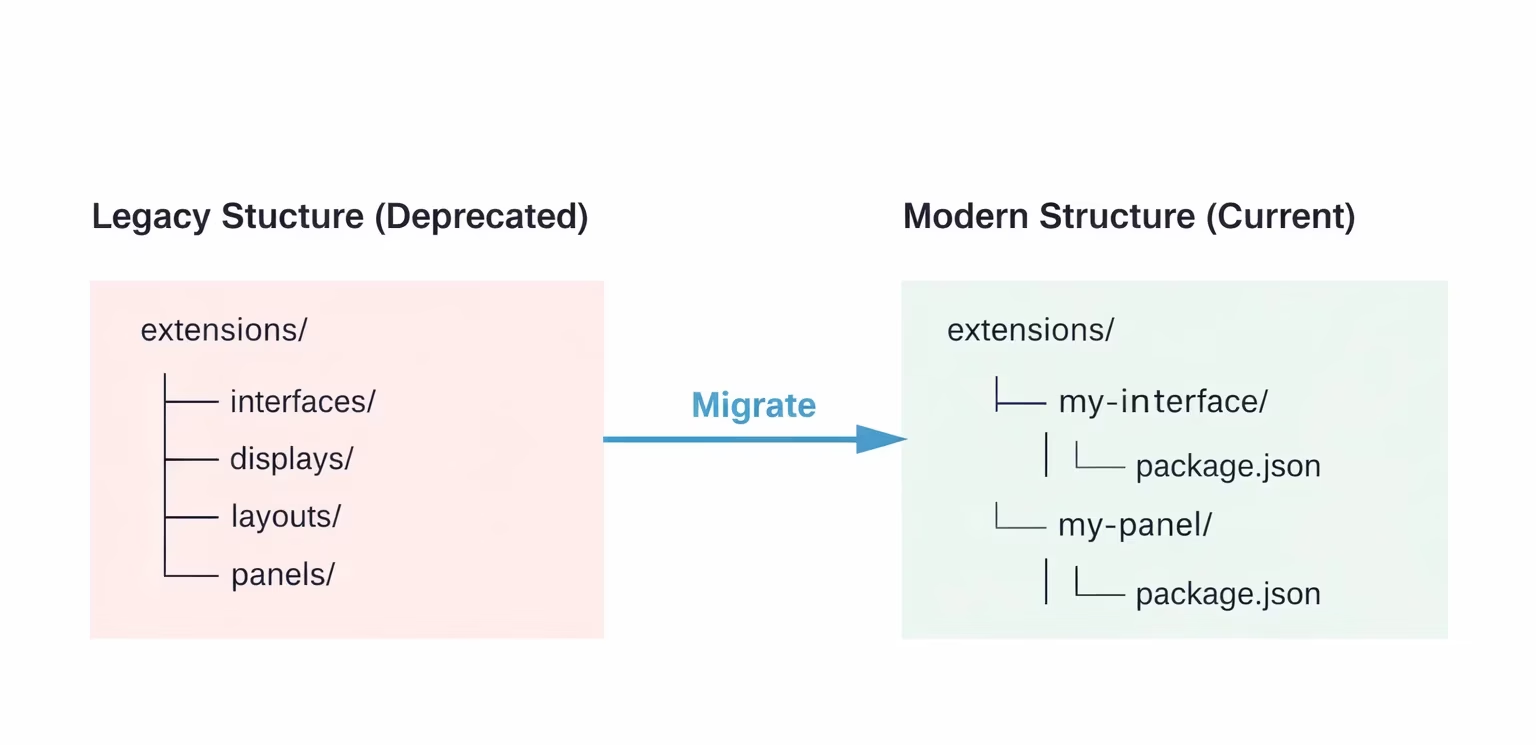
The modern approach treats each extension as an independent package. This makes programmatic management more reliable and simplifies deployment workflows.
Bundle Extensions for Shared Dependencies
Bundle extensions solve a common problem: multiple extensions needing shared code or dependencies. Instead of duplicating libraries across folders, bundles group related extensions together.
Creating a bundle with create-directus-extension generates a structure where multiple extensions coexist within one package, sharing node_modules and build configurations.
Creating Extensions with Proper Structure
The official CLI tool handles folder structure automatically. Running npx create-directus-extension@latest scaffolds everything needed—package.json, source directories, and build configuration.
But wait. The generated structure includes both src/ and dist/ folders. Source code goes in src/, while the compiled output lands in dist/. Directus loads extensions from the built files, not source.
Get Help When Your Project Starts Getting Hard to Manage
Working with a headless CMS is manageable early on, but things can get complicated once custom logic, integrations, and multiple environments come into play. Keeping the system structured and maintainable as the product grows often requires more than just initial setup. This is where a development team like Mobien can step in, especially when internal capacity is limited or the workload starts to pile up.
Mobian supports teams with backend development, system integration, and ongoing product work, typically working alongside in-house developers rather than replacing them. Their focus is on keeping the technical side stable as new features are added and requirements evolve.
If your project is getting harder to manage or you need extra development support to keep things moving, contact Mobien and get the right help in place before it slows everything down.
Conclusion
The Directus extensions folder structure has matured into a package-based system that prioritizes reliability and maintainability. Understanding this structure—and migrating away from deprecated type folders—ensures extensions work correctly across versions.
Check the official Directus documentation for current configuration options and explore bundle extensions when managing multiple related customizations.
FAQ
Where do I place custom extensions in Directus?
Place extensions in the ./extensions directory by default, or configure a custom path using the EXTENSIONS_PATH environment variable. Each extension needs its own subfolder with a package.json file.
Can I still use type-based folders like interfaces/ or displays/?
No. Directus deprecated the legacy type-based folder structure in version 10.3.0, and support for it was fully removed in version 11.0.0. All extensions now require individual folders with package.json files for proper detection and management.
What’s the difference between regular extensions and bundle extensions?
Bundle extensions allow multiple related extensions to share dependencies and build configurations within a single package structure, reducing duplication and simplifying maintenance for complex extension sets.
Do I need to build extensions before Directus can load them?
Yes. Extensions must be built into the dist/ folder before Directus can load them. The CLI provides build commands, and setting EXTENSIONS_AUTO_RELOAD enables automatic reloading during development.
How does Directus detect installed extensions?
Directus scans the extensions directory for folders containing valid package.json files. Each package.json must include extension metadata that identifies the type and configuration.
Can I organize extensions in subdirectories?
Extensions must be direct children of the configured extensions path. Nested subdirectories aren’t automatically scanned, though bundle extensions can contain multiple extensions within their own structure.
What happens if I don’t include a package.json file?
Directus won’t recognize the extension. The package.json requirement ensures programmatic management and proper metadata handling for all extensions.
Ready to stop rebuilding and start shipping?
Most of our engagements start with a single conversation about where your current team is stuck. No pitch deck, no obligations.


