
חֲדָשׁוֹת
Directus CMS Features: 50+ Tools for Data Management (2026)
Quick Summary: Directus CMS is an open-source headless content management system offering 50+ powerful features including visual data modeling, granular permissions, REST & GraphQL APIs, real-time collaboration, and workflow automation. According to the official website, it wraps custom SQL databases with instant APIs and an intuitive no-code data studio, making it ideal for developers who need flexible, database-first content management without traditional CMS constraints.
Traditional content management systems force databases to conform to rigid structures. Directus flips that model entirely.
Instead of building content around a CMS, Directus wraps itself around existing SQL databases. This database-first approach means developers maintain complete control over their data architecture while non-technical teams get an intuitive interface for content management.
According to the official Directus website, the platform includes powerful features spanning visual data modeling, granular permissions, dual APIs, real-time collaboration, and workflow automation. But here’s what makes it different: everything runs open source, and the platform works with custom SQL databases rather than proprietary data structures.
Real talk: the headless CMS market is crowded. Platforms like Strapi, Contentful, and Payload all compete for developer attention. What sets Directus apart is its complete database agnosticism and the fact that teams can self-host without vendor lock-in.
This guide breaks down the core Directus features that matter most for development teams in 2026.
Visual Data Modeling and Schema Management
Most headless CMS platforms lock developers into predefined data structures. Directus takes the opposite approach.
The platform provides a visual data modeling interface that creates actual database tables and relationships. When content teams build a new collection in the Directus interface, they’re creating real SQL tables with proper foreign keys, indexes, and constraints.
Here’s the thing though—Directus doesn’t require using the visual interface. Developers can create database tables directly through migrations or SQL scripts. Directus requires a manual ‘Schema Sync’ or a cache clear/refresh to reflect changes made directly in the SQL database via external tools.
According to official Directus documentation, the platform supports multiple SQL databases including PostgreSQL, MySQL, MariaDB, MS SQL Server, and SQLite. This database flexibility means development teams can choose the database that fits their infrastructure rather than adapting to CMS requirements.
The visual modeling interface handles complex relationships without code. Many-to-many relationships, nested structures, and junction tables all configure through the admin panel. For teams managing complex data models, this eliminates the constant back-and-forth between database administrators and content editors.
Field types cover everything from basic text and numbers to JSON objects, geospatial coordinates, and file references. The platform includes over 30 different field types, each mapping to appropriate database column types.
Database Migration Capabilities
Schema changes are inevitable. Directus handles this through a snapshot and migration system.
Developers can take snapshots of the current data model, make changes, then generate migration files that version control tracks. This approach works well for teams deploying across multiple environments—development, staging, and production schemas stay synchronized.
According to community discussions on GitHub, managing database migrations alongside a connected Directus instance requires coordination. When using tools like Alembic for Python applications, teams need to ensure migration sequences don’t conflict between the application layer and Directus-managed schema changes.
Flexible Layouts for Data Browsing
Different data types need different viewing interfaces. A product catalog doesn’t browse the same way as a calendar of events.
Directus addresses this through customizable layouts—different ways to view the same collection. According to official Directus documentation on Layouts (published August 2022), the platform offers multiple built-in layouts including table view, card view, calendar view, map view, and Kanban boards.
Table layout works best for traditional data browsing. Rows and columns display with sorting, filtering, and inline editing. Content teams can customize which fields appear, set column widths, and save view presets for different use cases.
Card layout transforms data into visual cards—ideal for media-heavy content like product catalogs or team directories. Each card displays featured images, titles, and custom field data in a responsive grid.
Calendar layout maps any collection with date fields onto a calendar interface. Publishing schedules, event management, and content planning become visual instead of tabular.
Map layout plots geospatial data on interactive maps. Any collection with latitude/longitude coordinates displays as map markers, perfect for store locations, real estate listings, or logistics tracking.
Kanban boards organize collections by status or category. Drag-and-drop functionality moves items between columns, making project management and workflow tracking more intuitive.
According to the official documentation, layouts support auto-refresh at configurable intervals—every 10 seconds, every 10 minutes, or custom timing. For teams monitoring real-time data like inventory levels or application metrics, this eliminates manual page refreshing.
Granular Permissions and Access Control
Enterprise content management demands precise access control. Not everyone should edit everything.
Directus implements role-based permissions with field-level granularity. Administrators can create unlimited roles, each with specific permissions across collections, fields, and individual records.
Permissions configure at multiple levels:
- Collection-level access (can this role view/create/update/delete items in this collection?)
- Field-level visibility (which fields can this role see and edit?)
- Record-level restrictions (can this role only access items they created?)
- Conditional permissions based on field values
Here’s where it gets interesting. Directus permissions support dynamic rules using filters. For example, a “Regional Manager” role might only access records where the region field matches their assigned region. This creates row-level security without custom code.
According to the official features page, Directus includes granular permissions as a core feature across all deployment types. This differs from some headless CMS platforms that reserve advanced permissions for enterprise tiers.
The permission system extends to API access as well. Each role generates different API responses based on what that role can access. An authenticated request from a content editor returns different fields than a request from a public website visitor.
Authentication Options
Directus supports multiple authentication methods beyond traditional username and password:
- SSO integration with SAML, OAuth, and OpenID providers
- LDAP directory services for enterprise environments
- API tokens for programmatic access
- Temporary access tokens with configurable expiration
For development teams building multi-tenant applications, Directus permissions enable complete data isolation between tenants using the same Directus instance.
Dual API Architecture: REST and GraphQL
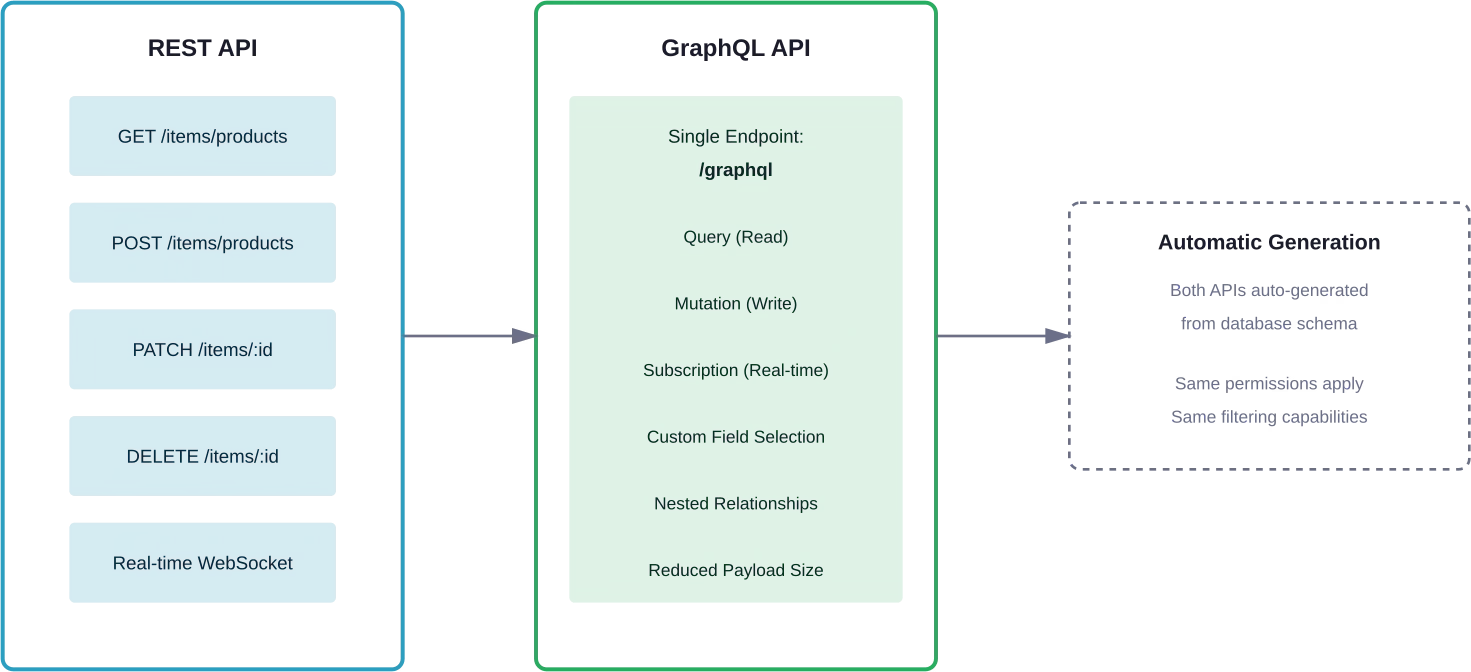
One database, two complete APIs. Directus automatically generates both REST and GraphQL endpoints for every collection.
The REST API follows standard conventions with predictable endpoints. Creating a “products” collection automatically generates endpoints for listing products, retrieving individual items, creating new products, updating existing ones, and deletion.
According to the official AWS marketplace listing, Directus provides a “Headless CMS & Real-Time API for SQL Databases.” That real-time capability extends through both API types.
GraphQL support means frontend developers can request exactly the data they need. Instead of fetching entire objects and filtering client-side, GraphQL queries specify which fields to return. This reduces payload sizes and speeds up applications.
Both APIs support advanced filtering, sorting, and search. Directus implements a powerful filter syntax that handles complex queries including:
- Comparison operators (equals, not equals, greater than, less than)
- Logical operators (and, or, not)
- String matching (contains, starts with, ends with)
- Null checks and existence queries
- Deep filtering on relational data
According to official Directus documentation, the platform enables sophisticated queries without requiring SQL knowledge. Content teams can build complex filters through the interface while developers can construct the same filters through API parameters.
API Performance and Caching
API response times matter for user experience. Directus implements several performance optimizations:
- Field selection to reduce response payload
- Result pagination with configurable limits
- Query result caching with Redis or Memcached
- Asset transformation caching for images
The platform also supports aggressive caching strategies for public-facing content that changes infrequently.
Real-Time Collaboration Features
Multiple team members editing the same content creates conflicts. Directus handles this through real-time collaboration features.
When someone opens an item for editing, other users see live indicators showing who’s currently viewing that record. This prevents two editors from making conflicting changes to the same content simultaneously.
Content locking can prevent edits when someone else is actively working. This optional feature protects against overwriting changes, particularly important for teams with complex approval workflows.
According to the official features page, real-time collaboration extends beyond just edit indicators. The platform includes:
- Live presence indicators showing active users
- Field-level change tracking and revision history
- Comment threads attached to specific items
- Activity logs showing who changed what and when
The revision history feature maintains a complete audit trail. Every change to every field gets recorded with timestamp and user attribution. Teams can revert individual fields or entire records to previous states.
For organizations with compliance requirements, this audit trail is essential. The revision system tracks not just what changed but also the context around each change.
Workflow Automation and Custom Hooks
Content management rarely exists in isolation. Data needs to flow to other systems, trigger notifications, or initiate business processes.
Directus implements this through flows—a visual workflow automation builder. Flows respond to triggers like item creation, updates, or scheduled times, then execute a series of operations.
Operations include:
- Sending emails or notifications
- Making HTTP requests to external APIs
- Running custom scripts or transformations
- Creating or updating related records
- Conditional logic and branching
Here’s a practical example: when a new product gets published, a flow could automatically resize product images, send notifications to the marketing team, update inventory in an external system, and post to social media via API.
For developers needing deeper customization, Directus provides event hooks that trigger custom code. These hooks fire at specific points in the data lifecycle—before create, after update, on delete, etc.
According to GitHub discussions on the Directus repository, the platform’s extensibility allows teams to build custom functionality without forking the core codebase. Custom endpoints, hooks, and interfaces deploy as extensions that survive Directus upgrades.
AI-Powered Content Management with Directus MCP
Artificial intelligence is reshaping content workflows. Directus introduced native MCP (Model Context Protocol) support to connect AI assistants directly to content.
According to the official Directus MCP documentation, this feature enables Claude, ChatGPT, and other AI tools to read, create, and manage data seamlessly. Instead of manually copying content between AI tools and the CMS, AI assistants work directly with the database.
The MCP integration allows AI to:
- Query existing content and data
- Generate new content items
- Update and modify records
- Understand data relationships and schema
For content teams, this means AI writing assistance happens in context. An AI assistant can review existing blog posts, understand the content structure, then generate new posts following the same format and style.
But here’s what makes it different from bolt-on AI features in other platforms: MCP provides direct database access with full respect for permissions. AI tools see exactly what the authenticated user can access, maintaining security boundaries.
Asset Management and Transformation
Digital assets—images, videos, documents—need specialized handling. Directus includes a comprehensive asset management system.
File uploads store in configurable locations: local filesystem, S3-compatible object storage, Google Cloud Storage, or Azure Blob Storage. For teams with existing asset infrastructure, Directus adapts rather than forcing migration.
Image transformation happens on-the-fly through URL parameters. Requesting an image with specific dimensions, format, or quality settings returns a transformed version without manually creating variants.
Supported transformations include:
- Resizing and cropping
- Format conversion (JPEG, PNG, WebP, AVIF)
- Quality adjustment
- Focal point cropping for responsive images
- Watermarking
The transformation system caches results, so requesting the same variant multiple times doesn’t repeatedly process the original file.
Asset organization uses folders and tagging. Large media libraries stay manageable through nested folder structures and metadata fields. Teams can add custom metadata like alt text, copyright information, or usage rights directly to asset records.
Extensibility and Customization
No CMS fits every use case out of the box. Directus addresses this through multiple extension points.
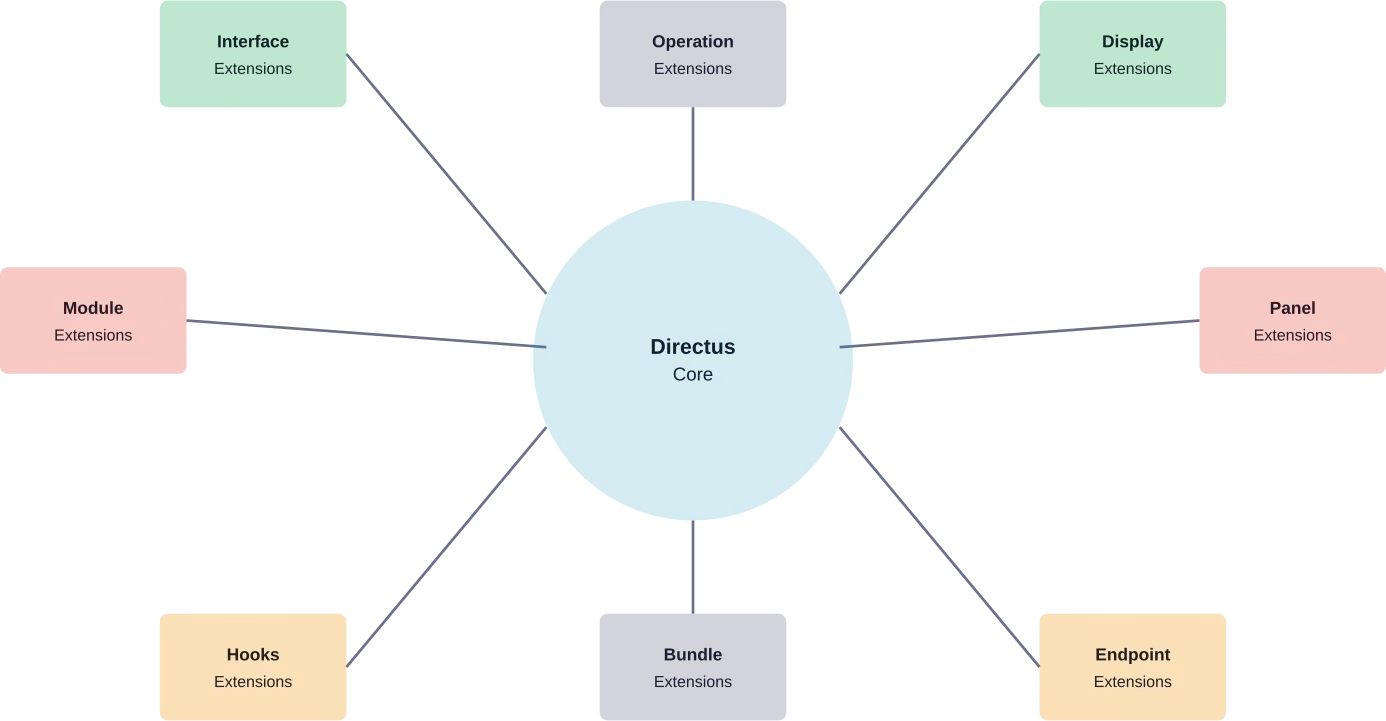
Interface extensions create custom field editors. If the 30+ built-in field types don’t cover a specific need, developers can build custom interfaces using Vue.js. These custom interfaces integrate seamlessly into the admin panel.
Display extensions control how field data appears in layouts. Custom displays might format numbers as currency, render markdown as HTML, or show relationships as interactive chips.
Module extensions add entirely new sections to the admin interface. Teams can build custom analytics dashboards, reporting tools, or specialized management interfaces.
According to GitHub repository documentation, Directus maintains an extension SDK that handles the build process and provides TypeScript types. Extensions install through npm packages or by placing files in the extensions directory.
Panel extensions add custom widgets to the Insights dashboard. These might display metrics from external systems, show real-time data visualizations, or provide quick actions for common tasks.
API Extension Points
Beyond interface customization, Directus allows extending the API layer:
- Custom endpoints for specialized operations
- Hooks for event-driven automation
- Custom middleware for request processing
- Operation extensions for workflow automation
This extensibility means teams can adapt Directus to complex business requirements without maintaining a forked version.
Insights and Analytics Dashboard
Data only creates value when teams can understand it. Directus Insights provides a dashboard builder for creating custom analytics panels.
According to official Directus documentation on Data Management (published October 2022), teams can visualize data with Insights and use no-code tools to create, update, and delete content.
Dashboard panels support various visualization types:
- Line charts for trends over time
- Bar charts for comparisons
- Pie charts for distribution
- Metric displays for key performance indicators
- List views for recent activity
Each panel connects to collections with filtering and aggregation. Dashboards might show total sales by region, content publication trends, user registration metrics, or inventory levels.
Multiple dashboards allow creating different views for different teams or purposes. The marketing team sees content performance metrics while operations monitors system health and usage statistics.
Dashboard sharing controls access. Some dashboards might be public while others require specific permissions to view.
Deployment Options and Infrastructure
Platform flexibility extends to deployment. Directus runs wherever Node.js runs.
Self-hosting provides complete control. Teams can deploy to traditional servers, containerized environments with Docker, or serverless platforms. The GitHub repository includes Docker configurations and deployment guides for various platforms.
According to authoritative sources from GitHub, Directus has accumulated over 34.5k stars and 4.6k forks, indicating substantial community adoption and contribution.
Cloud deployment options simplify infrastructure management. Directus offers managed cloud hosting that handles updates, backups, and scaling. For teams without DevOps resources, managed hosting eliminates server administration while maintaining access to all features.
The platform supports horizontal scaling for high-traffic deployments. Multiple Directus instances can run behind load balancers, all connecting to the same database. Stateless architecture means adding capacity is straightforward.
Database Compatibility
Database choice matters for performance and existing infrastructure integration. Directus supports:
- PostgreSQL (recommended for production)
- MySQL and MariaDB
- Microsoft SQL Server
- SQLite (primarily for development)
- CockroachDB and other PostgreSQL-compatible databases
This database agnosticism means teams can use existing database infrastructure rather than migrating to a CMS-specific database.
Directus vs Other Headless CMS Platforms
The headless CMS landscape includes several strong competitors. Understanding where Directus fits requires comparing core philosophies.
According to a Medium article comparing Directus and Strapi published in May 2025 (by Nitin Goswami), both allow managing content independently from the front end but take different approaches to structure and delivery.
Strapi follows a code-first approach where content types are defined through code and configuration files. Directus wraps existing databases and allows visual schema definition.
Contentful operates as a pure API-first SaaS platform with proprietary data storage. Directus gives teams complete control over the database layer.
According to a Dev.to comparison covering Directus and Payload discussing architectural approaches, the fundamental choice is whether to use a standalone separate API or an embedded CMS within the application. Payload embeds directly into Next.js applications while Directus runs as a separate service.
| פּלַטפוֹרמָה | Database Control | Deployment Model | Configuration Approach
|
|---|---|---|---|
| Directus | Full control, any SQL database | Self-hosted or managed cloud | Visual interface or migrations |
| Strapi | ORM abstraction layer | Self-hosted or Strapi Cloud | Code-first configuration |
| Contentful | Proprietary SaaS backend | Managed SaaS only | API and web interface |
| Payload | MongoDB or Postgres via ORM | Embedded in app or standalone | Code-first with TypeScript |
| Sanity | Proprietary GROQ database | Managed SaaS with local dev | Schema as code |
According to reviews of headless CMS platforms in 2024, platforms differ substantially in pricing, feature sets, and target audiences.
For manufacturing companies specifically, a WeFrameTech analysis noted approximate annual costs. According to WeFrameTech analysis for manufacturing companies, Directus implementation costs range from $20,000 to $35,000 annually, Payload CMS from $30,000 to $45,000, and Strapi from $40,000 to $45,000. These estimates include implementation and infrastructure costs for enterprise deployments.
But here’s the thing—cost estimates vary dramatically based on scale, hosting choice, and customization requirements. Open-source platforms like Directus can run with minimal cost for small projects or require significant investment for enterprise implementations.
Integration with Modern Frameworks
Headless CMS platforms need to work seamlessly with frontend frameworks. Directus maintains official guides for popular frameworks.
According to tutorials on the official Directus site, the platform integrates smoothly with Next.js, Astro, Nuxt, SvelteKit, and other modern frameworks. The integration pattern remains consistent: authenticate, fetch data via API, render components.
For Next.js specifically, static generation, server-side rendering, and incremental static regeneration all work with Directus APIs. Content editors make changes in Directus while developers build with their preferred React patterns.
Astro integration follows similar principles. The Directus SDK provides TypeScript types for collections, making development type-safe. Build-time data fetching generates static sites while still allowing dynamic updates when needed.
The platform also supports traditional server-rendered applications, single-page applications, and mobile apps. Any client capable of making HTTP requests can consume Directus APIs.
Pricing and Open Source Model
Directus operates under an open-source model with optional commercial services.
Directus is licensed under the BSL 1.1 (Business Source License), transitioning to GPLv2 after a certain period (usually 3 years), or remains free for entities under $5M USD in total revenue.
According to the official website, the 50+ features including visual data modeling, granular permissions, REST and GraphQL APIs, real-time collaboration, and workflow automation are all included in the open-source version.
Commercial offerings include:
- Directus Cloud (managed hosting with automatic updates and backups)
- Enterprise support contracts
- Professional services for implementation
- Custom feature development
For current pricing on managed cloud services or enterprise support, check the official Directus website since pricing structures may change.
The open-source model creates flexibility. Small projects can self-host at minimal cost while enterprises can purchase support and managed services when needed.
Common Use Cases and Applications
Directus adapts to diverse content management scenarios. Real-world implementations span multiple industries.
E-commerce backends benefit from flexible product data modeling. Teams can structure product attributes, variant options, inventory tracking, and pricing exactly as their business requires rather than conforming to rigid product models.
Publishing platforms use Directus to manage articles, authors, media assets, and publication workflows. The revision history and role-based permissions support editorial processes with multiple review stages.
Application backends store user data, settings, and application content. Mobile apps and web applications use Directus as a backend-as-a-service, handling data persistence without building custom API servers.
IoT data collection leverages real-time capabilities. Sensor data flows into Directus collections where dashboards visualize trends and flows trigger alerts based on thresholds.
Multi-tenant SaaS platforms use Directus as a shared data layer with permissions isolating tenant data. Each customer’s data remains separate while sharing the same infrastructure.
According to community discussions, teams appreciate the ability to start simple then expand. A basic content repository can evolve into a complex data platform without migrating to different technology.
Use Directus Features Without Getting Stuck in Setup
Directus comes with a long list of tools, but using them effectively depends on how everything is implemented around it. Data structures, permissions, APIs, and integrations all need to be aligned with the product you’re building. That’s where a development team like מוביאן can support the process, especially when things move beyond basic setup and start requiring custom logic and system-level decisions.
Mobian works on building and extending digital products, often joining projects where the foundation is already in place but needs to be pushed further. This can include refining backend structure, connecting external services, or supporting ongoing development as requirements evolve.
If you’re looking to move from features on paper to something that actually runs smoothly, contact מוביאן and move the project forward with the right technical support in place.
Performance Considerations
Platform performance depends on multiple factors: database optimization, API response times, and frontend implementation.
Database performance matters most since Directus queries pass directly to the underlying SQL database. Proper indexing, query optimization, and database tuning apply the same as any database-driven application.
API response caching reduces load for frequently accessed content. Directus supports cache configuration at multiple levels—collection caching, asset caching, and response caching.
For high-traffic deployments, content delivery networks cache API responses at edge locations. Public content that changes infrequently can cache aggressively, reducing origin server load.
Asset delivery performance benefits from dedicated storage. Using S3 or similar object storage with CloudFront or other CDN ensures fast asset delivery globally.
Database connection pooling prevents connection exhaustion under load. Directus configures connection pool sizes based on expected concurrent users and query patterns.
Security Features and Best Practices
Platform security requires attention across authentication, authorization, data protection, and infrastructure.
Authentication security starts with strong password policies and support for two-factor authentication. SSO integration allows leveraging enterprise identity providers with established security controls.
Authorization through granular permissions ensures users only access appropriate data. Field-level and row-level security create defense in depth—even if authentication is compromised, permissions limit damage.
Data encryption protects information at rest and in transit. HTTPS enforces encrypted connections while database-level encryption secures stored data.
API rate limiting prevents abuse and denial-of-service attacks. Configurable rate limits per role or per endpoint protect against both malicious attacks and accidental overuse.
Security headers configure CORS, CSP, and other browser security mechanisms. Proper configuration prevents cross-site scripting and other browser-based attacks.
Regular updates address security vulnerabilities. The open-source model means security researchers can audit code and report issues. For teams using managed cloud hosting, Directus handles security patches automatically.
Community and Ecosystem
Platform longevity depends on active community and ecosystem health. Directus benefits from substantial open-source community engagement.
According to GitHub data, the repository shows active development with thousands of commits and hundreds of contributors. Regular releases add features and fix issues.
Community resources include official documentation, video tutorials, and community forums. Developers share extensions, templates, and integration patterns.
The extension marketplace provides ready-made customizations. Instead of building common functionality from scratch, teams can install community-contributed extensions.
Third-party integrations connect Directus to other tools. Zapier integrations, workflow automation connections, and framework-specific SDKs expand capabilities.
Commercial ecosystem includes agencies specializing in Directus implementations, hosting providers offering optimized Directus environments, and consultants providing expertise.
מַסְקָנָה
Directus delivers a comprehensive feature set that challenges assumptions about what headless CMS platforms should be.
The database-first architecture sets it apart. Instead of forcing data into CMS-specific structures, Directus wraps existing databases with intuitive interfaces and instant APIs. Development teams maintain complete control over data architecture while content teams get visual tools for management.
According to the official website, 50+ features span visual data modeling, granular permissions, dual REST and GraphQL APIs, real-time collaboration, workflow automation, and AI integration through native MCP support. Everything runs open source without license restrictions.
But features alone don’t determine platform fit. The right headless CMS depends on project requirements, team capabilities, and infrastructure constraints.
Directus excels when teams need:
- Flexible data modeling beyond basic content types
- Integration with existing SQL databases
- Self-hosting control or managed cloud options
- Open-source licensing without vendor lock-in
- Extensibility through custom interfaces and APIs
For teams building data-heavy applications, multi-tenant platforms, or complex content ecosystems, Directus provides the flexibility required without forcing architectural compromises.
Ready to explore Directus for your project? Start with the official documentation at directus.io to understand setup options, review the feature set in detail, and determine whether the platform fits your content management needs. The open-source license allows testing thoroughly before committing to production deployment.
שאלות נפוצות
What databases does Directus support?
Directus works with PostgreSQL, MySQL, MariaDB, Microsoft SQL Server, SQLite, and other SQL-compatible databases. PostgreSQL is recommended for production deployments. The platform wraps existing database schemas, so teams can connect Directus to established databases without migration.
Can Directus handle enterprise-scale deployments?
Yes. Directus supports horizontal scaling with multiple instances behind load balancers. The stateless architecture allows adding capacity as needed. Enterprise features include granular permissions, audit logging, SSO integration, and high-availability configurations. According to community discussions, organizations use Directus for large-scale, data-heavy applications with proper database optimization and infrastructure design.
How does Directus pricing work?
Directus is licensed under the BSL 1.1 (Business Source License), transitioning to GPLv2 after a certain period (usually 3 years), or remains free for entities under $5M USD in total revenue. Directus also offers managed cloud hosting and enterprise support contracts at additional cost. For current pricing on commercial services, check the official Directus website since pricing structures change periodically.
What’s the difference between Directus and traditional CMS platforms like WordPress?
Traditional CMS platforms combine content management, database, and frontend presentation in a monolithic system. Directus is a headless CMS that provides content management and APIs without dictating frontend presentation. This separation allows using any frontend framework while Directus handles content. Additionally, Directus wraps custom SQL databases while WordPress uses a predefined schema.
Does Directus require coding knowledge?
Content editors and administrators can use Directus without coding through the visual interface. Creating collections, managing content, configuring permissions, and building workflows all work through point-and-click interfaces. Developers benefit from API access, custom extensions, and workflow automation that require coding knowledge. The platform serves both technical and non-technical users.
Can Directus integrate with existing applications?
Yes. Directus can connect to existing databases. Applications already using a SQL database can add Directus for content management without changing the database structure. The REST and GraphQL APIs allow existing applications to query and update data through Directus. Custom endpoints extend the API for application-specific operations.
What frontend frameworks work with Directus?
Directus works with any framework capable of making HTTP requests. Official integration guides cover Next.js, Nuxt, Astro, SvelteKit, and other popular frameworks. The platform-agnostic API design means React, Vue, Angular, vanilla JavaScript, mobile apps, and server-side applications all integrate using standard HTTP clients. The Directus SDK provides TypeScript types and helper functions for common frameworks.
Ready to stop rebuilding and start shipping?
Most of our engagements start with a single conversation about where your current team is stuck. No pitch deck, no obligations.


